Integrate with Claude Code
Claude Code is an AI coding assistant that runs in the terminal.
Migrate from Existing Installation to DeepSeek
If you already have Claude Code installed, simply configure the following environment variables to point to the DeepSeek Anthropic API. Get your API Key from the DeepSeek Platform:
Linux / Mac users:
export ANTHROPIC_BASE_URL=https://api.deepseek.com/anthropic
export ANTHROPIC_AUTH_TOKEN=<your DeepSeek API Key>
export ANTHROPIC_MODEL=deepseek-flash[1m]
export ANTHROPIC_DEFAULT_OPUS_MODEL=deepseek-flash[1m]
export ANTHROPIC_DEFAULT_SONNET_MODEL=deepseek-flash[1m]
export ANTHROPIC_DEFAULT_HAIKU_MODEL=deepseek-flash
export CLAUDE_CODE_SUBAGENT_MODEL=deepseek-flash
export CLAUDE_CODE_EFFORT_LEVEL=max
export CLAUDE_CODE_AUTO_COMPACT_WINDOW=786432
Windows users:
$env:ANTHROPIC_BASE_URL="https://api.deepseek.com/anthropic"
$env:ANTHROPIC_AUTH_TOKEN="<your DeepSeek API Key>"
$env:ANTHROPIC_MODEL="deepseek-flash[1m]"
$env:ANTHROPIC_DEFAULT_OPUS_MODEL="deepseek-flash[1m]"
$env:ANTHROPIC_DEFAULT_SONNET_MODEL="deepseek-flash[1m]"
$env:ANTHROPIC_DEFAULT_HAIKU_MODEL="deepseek-flash"
$env:CLAUDE_CODE_SUBAGENT_MODEL="deepseek-flash"
$env:CLAUDE_CODE_EFFORT_LEVEL="max"
$env:CLAUDE_CODE_AUTO_COMPACT_WINDOW="786432"
Then enter your project directory and run claude:
cd /path/to/my-project
claude
Install Claude Code from Scratch
1. Install Claude Code
- Install Node.js 18+.
- Windows users need to install Git for Windows.
- Run the following command in your terminal to install Claude Code:
npm install -g @anthropic-ai/claude-code
- After installation, run the following command. If the version number is displayed, the installation is successful:
claude --version
2. Configure Environment Variables
Linux / Mac users, run the following commands to configure the relevant environment variables. Get your API Key from the DeepSeek Platform:
export ANTHROPIC_BASE_URL=https://api.deepseek.com/anthropic
export ANTHROPIC_AUTH_TOKEN=<your DeepSeek API Key>
export ANTHROPIC_MODEL=deepseek-flash[1m]
export ANTHROPIC_DEFAULT_OPUS_MODEL=deepseek-flash[1m]
export ANTHROPIC_DEFAULT_SONNET_MODEL=deepseek-flash[1m]
export ANTHROPIC_DEFAULT_HAIKU_MODEL=deepseek-flash
export CLAUDE_CODE_SUBAGENT_MODEL=deepseek-flash
export CLAUDE_CODE_EFFORT_LEVEL=max
export CLAUDE_CODE_AUTO_COMPACT_WINDOW=786432
Windows users, run:
$env:ANTHROPIC_BASE_URL="https://api.deepseek.com/anthropic"
$env:ANTHROPIC_AUTH_TOKEN="<your DeepSeek API Key>"
$env:ANTHROPIC_MODEL="deepseek-flash[1m]"
$env:ANTHROPIC_DEFAULT_OPUS_MODEL="deepseek-flash[1m]"
$env:ANTHROPIC_DEFAULT_SONNET_MODEL="deepseek-flash[1m]"
$env:ANTHROPIC_DEFAULT_HAIKU_MODEL="deepseek-flash"
$env:CLAUDE_CODE_SUBAGENT_MODEL="deepseek-flash"
$env:CLAUDE_CODE_EFFORT_LEVEL="max"
$env:CLAUDE_CODE_AUTO_COMPACT_WINDOW="786432"
3. Enter the project directory and execute the claude command to get started.
cd /path/to/my-project
claude
Using Web Search in Claude Code
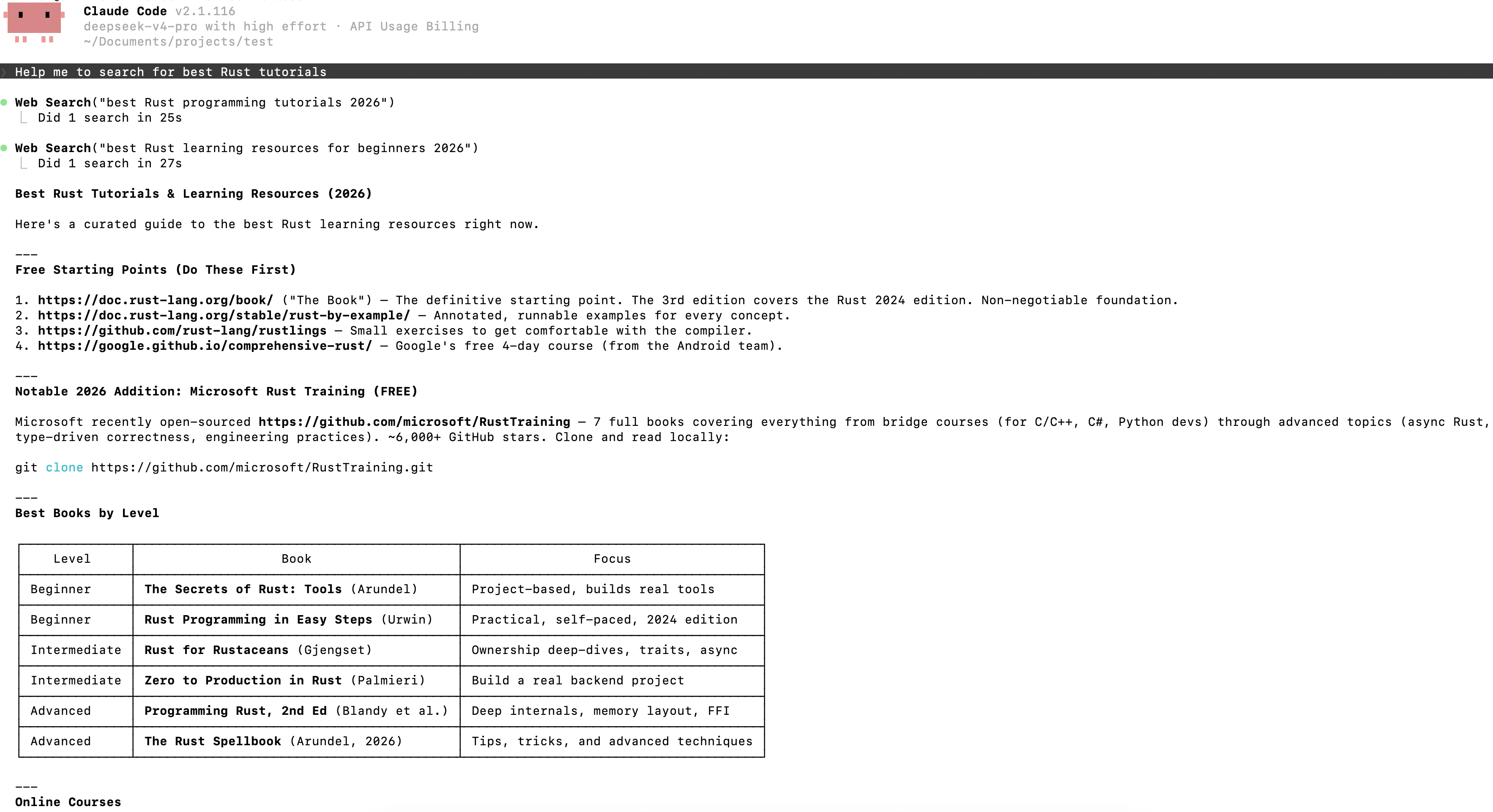
The DeepSeek API natively supports the Web Search feature in Claude Code. When using Claude Code, if the model determines that your question requires a web search, it will invoke the Web Search tool and perform the search through the API provided by DeepSeek. Because invoking the Web Search tool generates additional LLM API requests to summarize the retrieved search content, additional model token costs will be incurred.
The following image shows an example of triggering the Web Search feature in Claude Code, where the user's question (Help me to search for best Rust tutorials) triggered the Web Search tool:
Model Mapping When Using Claude Code or Claude Desktop APP
When you use Claude Code or Claude Desktop APP, we map the Claude model names you pass in:
- Models starting with claude-opus are mapped to
deepseek-v4-pro - Models starting with claude-haiku or claude-sonnet are mapped to
deepseek-flash
The claude-opus mapping points to deepseek-v4-pro, which is billed at the V4 Pro price.
With this mapping, when using the developer mode of the new Claude Desktop APP, you can bypass the APP's model name restrictions by simply changing the base_url and api_key to connect to DeepSeek models.