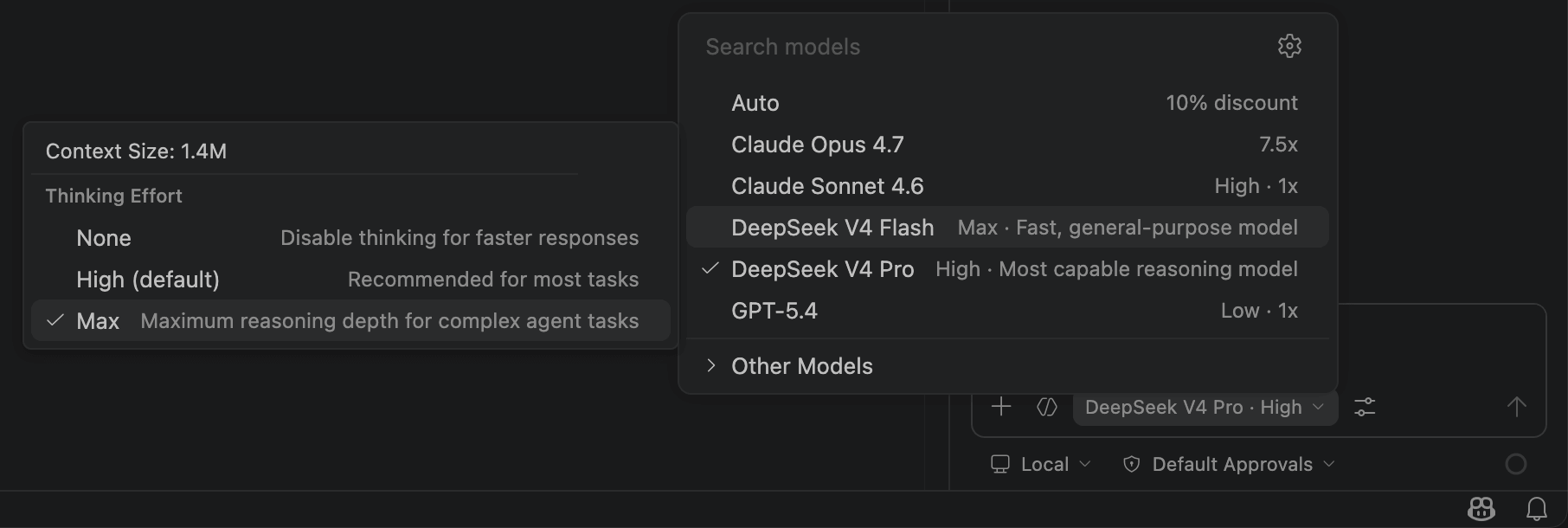
Integrate with GitHub Copilot
DeepSeek V4 for Copilot Chat is a VS Code extension that adds DeepSeek V4 Pro & Flash directly into the GitHub Copilot Chat model picker. You keep Copilot's agent mode, tool calling, skills, and MCP — all powered by DeepSeek.
1. Install the Extension
- Install VS Code 1.116 or later.
- Make sure you have a GitHub Copilot subscription (Free / Pro / Enterprise — the free tier works).
- Install the extension from the Github repo.
2. Get a DeepSeek API Key
- Go to DeepSeek Platform and create an API key.
- Copy the key (it starts with
sk-).
3. Configure the API Key in VS Code
- Open the Command Palette (
Cmd+Shift+P/Ctrl+Shift+P). - Run DeepSeek: Set API Key and paste your key.
- The key is stored securely in the OS keychain, never on disk.
4. Select the Model and Start Chatting
- Open Copilot Chat (
Cmd+Shift+I/Ctrl+Shift+I). - Click the model picker at the top-right of the chat panel.
- Choose DeepSeek V4 Pro or DeepSeek V4 Flash.
- Start chatting — agent mode, tool calling, and all Copilot features work out of the box.
Optional: Configure Thinking Effort
In the model picker, click the gear icon next to a DeepSeek model to choose the thinking effort level:
- None — fastest, no reasoning.
- High — balanced (default).
- Max — deep reasoning for complex tasks.
Optional: Vision Support
DeepSeek V4 is text-only, but the extension handles images automatically. Drop a screenshot into chat and it proxies through another installed Copilot model (Claude, GPT-4o) to describe the image before sending to DeepSeek. Run DeepSeek: Set Vision Proxy Model to pick which model handles image descriptions.