Integrate with AI Tools
This guide shows how to integrate DeepSeek models with popular AI coding tools, including Claude Code, OpenCode, and OpenClaw.
Integrate with Claude Code
Claude Code is an AI coding assistant that runs in the terminal.
1. Install Claude Code
- Install Node.js 18+.
- Windows users need to install Git for Windows.
- Run the following command in your terminal to install Claude Code:
npm install -g @anthropic-ai/claude-code
- After installation, run the following command. If the version number is displayed, the installation is successful:
claude --version
2. Configure Environment Variables
Linux / Mac users, run the following commands to configure environment variables for the DeepSeek Anthropic API. Get your API Key from the DeepSeek Platform:
export ANTHROPIC_BASE_URL=https://api.deepseek.com/anthropic
export ANTHROPIC_AUTH_TOKEN=<your DeepSeek API Key>
export ANTHROPIC_MODEL=deepseek-v4-pro[1m]
export ANTHROPIC_DEFAULT_OPUS_MODEL=deepseek-v4-pro[1m]
export ANTHROPIC_DEFAULT_SONNET_MODEL=deepseek-v4-pro[1m]
export ANTHROPIC_DEFAULT_HAIKU_MODEL=deepseek-v4-flash
export CLAUDE_CODE_SUBAGENT_MODEL=deepseek-v4-flash
export CLAUDE_CODE_EFFORT_LEVEL=max
Windows users, run:
$env:ANTHROPIC_BASE_URL="https://api.deepseek.com/anthropic"
$env:ANTHROPIC_AUTH_TOKEN="<your DeepSeek API Key>"
$env:ANTHROPIC_MODEL="deepseek-v4-pro[1m]"
$env:ANTHROPIC_DEFAULT_OPUS_MODEL="deepseek-v4-pro[1m]"
$env:ANTHROPIC_DEFAULT_SONNET_MODEL="deepseek-v4-pro[1m]"
$env:ANTHROPIC_DEFAULT_HAIKU_MODEL="deepseek-v4-flash"
$env:CLAUDE_CODE_SUBAGENT_MODEL="deepseek-v4-flash"
$env:CLAUDE_CODE_EFFORT_LEVEL="max"
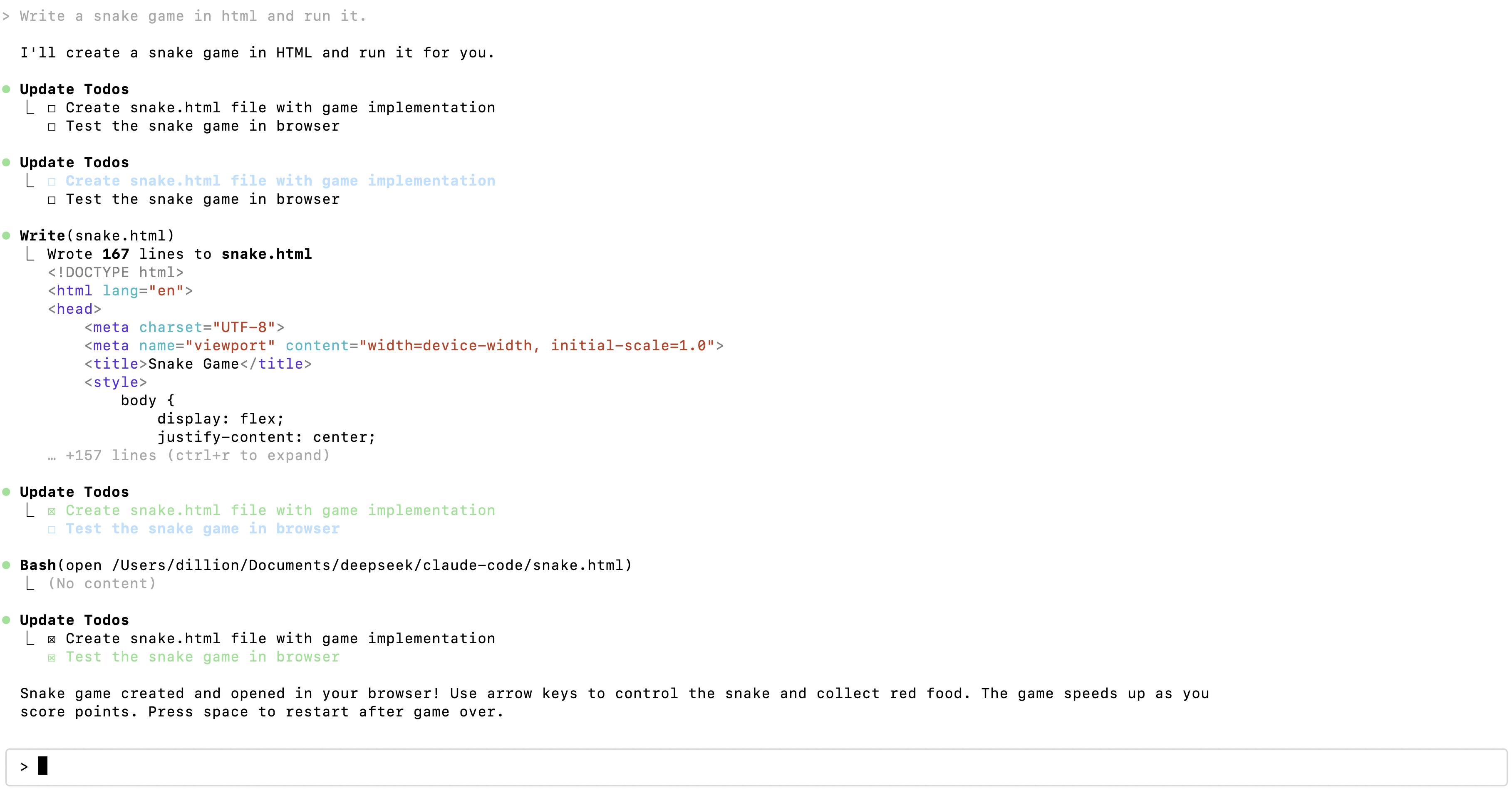
3. Enter the project directory and execute the claude command to get started.
cd /path/to/my-project
claude
Integrate with OpenCode
OpenCode is an open-source AI coding assistant available in terminal, web, and other forms.
1. Install OpenCode
For installation instructions, please refer to the OpenCode download page.
To avoid compatibility issues, it is strongly recommended to upgrade OpenCode to the latest version, ensuring the version number is >= v1.14.24.
2. Run and Configure
- Execute the
opencodecommand - Type
/connectin the input box, then enterdeepseekand select the provider - Enter your DeepSeek API Key
- Select the DeepSeek-V4-Pro model
Integrate with OpenClaw
OpenClaw is an open-source personal AI assistant that can connect to popular chat tools like Feishu and WeChat, and can be extended through Skills.
1. Install OpenClaw
Linux / Mac users, run the following command from the OpenClaw install script to install:
curl -fsSL https://openclaw.ai/install.sh | bash
Windows users, run the following command from the OpenClaw install script to install:
iwr -useb https://openclaw.ai/install.ps1 | iex
2. Configure the Default Model in OpenClaw
After the initial installation, you will automatically enter the setup phase. Users who have already installed OpenClaw can enter the configuration phase via the openclaw onboard --install-daemon command.
- When prompted:
I understand this is personal-by-default and shared/multi-user use requires lock-down. Continue?Select Yes. - When prompted:
Setup modeIt is recommended to select QuickStart. - When prompted:
Model/auth providerSelect DeepSeek. - When prompted:
Enter DeepSeek API keyEnter your DeepSeek API Key. - When prompted:
Default modelNavigate to Enter model and enter the model name (deepseek-v4-proordeepseek-v4-flash). - For the remaining configuration (message channels, Skills, etc.), configure as needed. Beginners can select Skip for now.
3. Get Started
Open the Web UI and interact on the Chat page:
openclaw dashboard
Open the TUI in the terminal:
openclaw tui
Chat with OpenClaw in the terminal:
openclaw terminal